
Epicflow marks the tasks that decide when your project can finish, so you know where speeding up work actually pays off.
Why Epicflow calculates the critical path
Every project has a limited number of tasks that determine its end date. If you speed up one of these tasks, the whole project can finish earlier. If you speed up any other task, the end date does not change.
Epicflow calculates the critical path so you can:
- see which tasks determine the project end date;
- put extra people, time or money only where it brings the project end forward;
- see how much time other tasks can slip without delaying the project;
- see what finishing earlier is worth in money (Drag Cost).
What a critical path is
A project is a network of tasks. Any route from the project start to the project end through dependent tasks is a path. Even a modest project can contain many paths, because each parallel split multiplies the routes.
The critical path is the longest of those paths. Its length is the shortest possible duration of the whole project: the project cannot finish sooner than the critical path allows.
What the calculation takes into account
The critical path is calculated per project, from project start to project end, based on:
- the links between tasks (predecessors and successors);
- the duration of each task, which depends on its work (hours), its assignment units and its calendar, including holidays. For example, a 16 h task on a calendar with 2 working hours per day takes 8 working days.
The calculation does not take into account:
- intermediate milestones;
- phases;
- task constraints (Start after and Finish before).
A task that is held back by a milestone, a phase or a constraint can therefore start or finish later than the critical path suggests, without its CP label, drag or slack changing.
Tasks can only be linked to tasks in the same project, so other projects do not affect a project’s critical path.
Because the critical path is built from the links between tasks, it is only as accurate as those links; see Planning prerequisites.
The CP attribute: CP, CP alt and 90% CP
Epicflow calculates all paths for you and labels each task in the Critical Path attribute (Screen #1). This is a system attribute: it is set automatically and cannot be removed manually. The labels update automatically whenever you change work, links or tasks; you don’t need to run a prediction first.

Screen #1 – CP attribute on the Task Card
On the task card, the Critical Path attribute is shown with the Epicflow label, for example Epicflow: CP. This is the same attribute that appears as the Critical Path column in the Table.
| Value | What it means | What it tells you |
|---|---|---|
| CP | The task is on the critical path, the longest path from project start to project end. | Shortening this task can bring the project end forward. |
| CP alt | The task is on another path that is exactly as long as the critical path. | This path is just as critical. Shortening only one of the equal paths does not move the end date. |
| 90% CP | The task is on a path that is shorter than the critical path but more than 90% of its length. | Not critical today, but close. A small delay here can make it critical. |
| No value | The task’s path is 90% of the critical path’s length or less. | The task can be delayed without moving the project end – it has slack. |
Why CP alt is a separate label. When two paths are equally long, both are critical. Epicflow labels the tasks on one of them CP and the tasks on every other equally long path CP alt; which path gets CP is arbitrary. The separate label shows that CP alt tasks sit on a parallel chain, not in the same chain as the CP tasks.
Why 90% CP exists. If you only watch the critical path, you miss the paths that are about to become critical. Once you shorten the critical path, a 90% CP path is usually the next one to determine the project end.
Worked example
Take a project where Task A (40 h) and Task B (16 h) run in parallel, and Task C (30 h) can start only when both are done (Screen #2). All tasks use the Default calendar (8 working hours per day).
- Critical path: Start → A → C → End = 40 + 30 = 70 h
- Other path: Start → B → C → End = 16 + 30 = 46 h
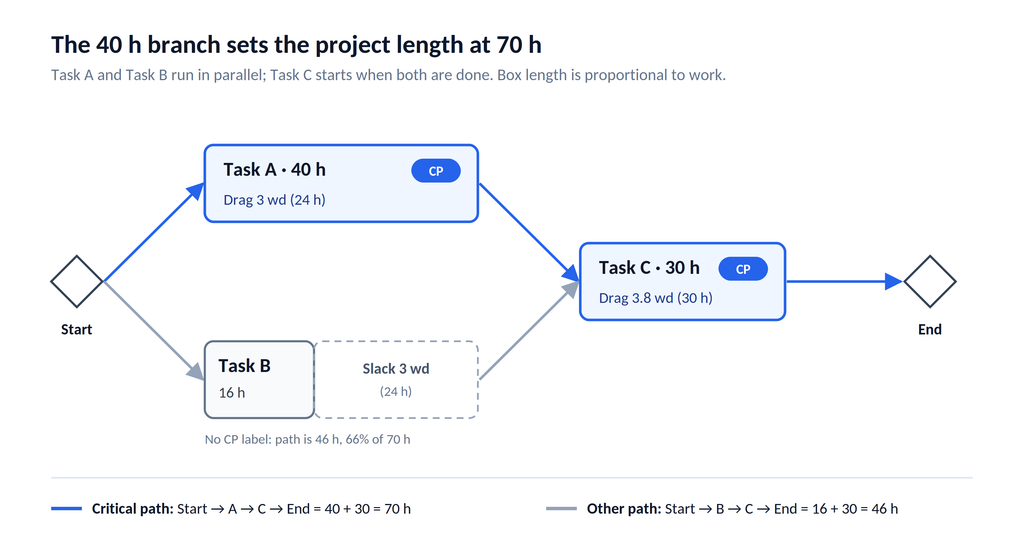
Screen #2 – CP example
The path through A is longer, so A and C are labelled CP and the project needs at least 70 h. B can grow by up to 24 h without any effect on the end date.
- If B took 35 h instead of 16 h, its path would be 65 h, more than 90% of 70 h, and B would be labelled 90% CP. At exactly 33 h (63 h, 90%) it would get no label.
- If B took exactly 40 h, both paths would be 70 h: one of A and B would be labelled CP, the other CP alt.
- If B’s assignee worked only 2 hours per day, B would take 8 working days instead of 2. Its path would then be longer than A’s, so B would become CP and A would lose its label.
Slack, Drag and Drag Cost
Definitions
- Slack is how much a task that is not on the critical path can grow, or start later, before it delays the project end.
- Drag is how much the project end would move forward if a critical task were shortened, even down to zero. It is limited by parallel paths: once a critical task is short enough, another path becomes critical and further shortening no longer helps.
- Drag Cost is what that drag is worth in money: the extra revenue the project would earn if it finished earlier by the task’s drag.
How Epicflow shows them
- Drag is shown for tasks on the critical path, and Slack for all other tasks.
- Both are shown in working days (wd), rounded to one decimal, based on the task’s calendar.
- Drag Cost is calculated from your Bonus/Penalty settings. Epicflow takes the planned project end, moves it earlier by the task’s drag, and recalculates project revenue. The difference between the two revenues is the Drag Cost. Tasks with the same drag have the same Drag Cost, wherever they are in the project.
Showing the columns
- Open the Pipeline or a project view.
- Click Table.
- Under Attributes, select Critical Path.
- Under Columns, click Show more columns and select DRAG, wd, Slack, wd and DRAG Cost (Screen #3).
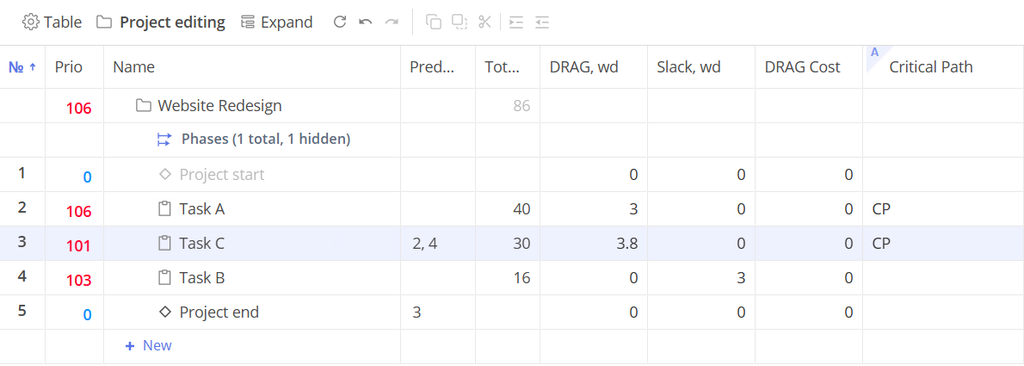
Screen #3 – Critical Path, DRAG, wd, Slack, wd and DRAG Cost columns in the Table
In the worked example (Screen #3)
- Task A is labelled CP with a drag of 3 wd (24 h). Cutting it below 16 h gains nothing more, because Task B’s branch then becomes critical.
- Task C is labelled CP with a drag of 3.8 wd (30 h at 8 h per day). Nothing runs in parallel with it, so its whole duration is drag.
- Task B has no label and 3 wd (24 h) of slack. It can take up to 40 h without moving the project end.
When two paths are exactly equal, every task on them has a drag of 0, because shortening only one of them does not bring the end date forward. A summary task can show a drag value taken from its subtasks; the CP label appears on the subtasks themselves.
How to use it
- Speed up CP and CP alt tasks only. Adding a second person, assigning someone on a calendar with more working hours, or changing how the task is done all shorten a task. On a critical task this can move the project end; elsewhere it does not.
- Use drag to know when to stop. In the example, two people might finish the 40 h task in about 22 h and three in about 14 h. A fourth person adds nothing, because below 16 h Task B’s branch becomes critical.
- Use slack for flexibility. A task with slack can start later or take longer, for example around someone’s vacation, without delaying the project.
- Watch 90% CP tasks. They are the first to become critical when a CP task is shortened or a 90% CP task slips.